How to turn a ChatGPT conversation into a video
Kario Team · October 26, 2026 · 3 min read
Your ChatGPT chats about your work already hold what a video needs: what you're building, who it's for, the words you use for it. Share the chat with Kario. Don't ask ChatGPT to write a prompt for it.
Make a video from a ChatGPT chat
-
Pick the chat that's most about your work. It doesn't need to mention a video.
-
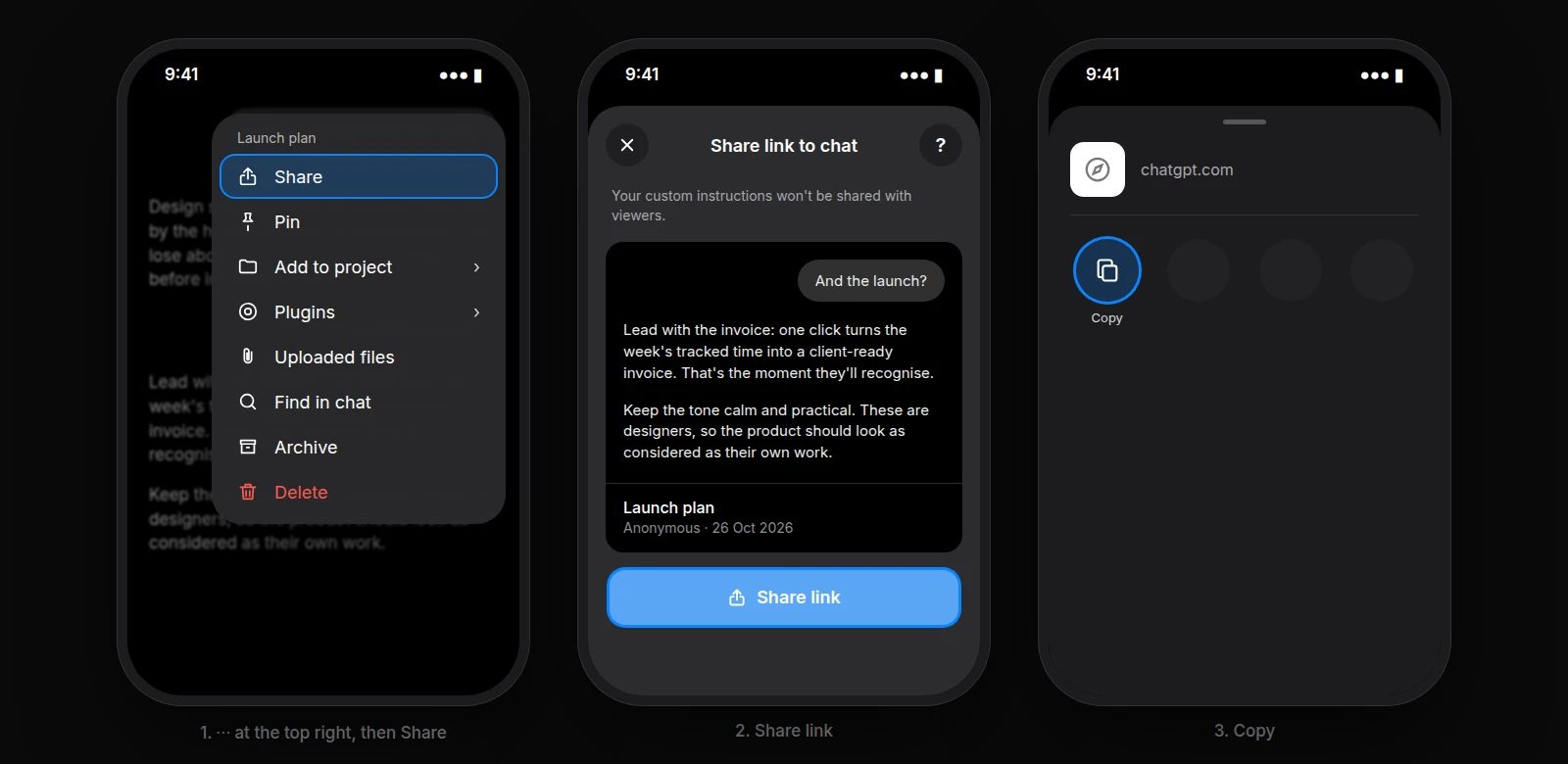
Copy its share link. On the web, select Share at the top right of the chat.
In the app, tap ⋯, then Share, then Share link, then Copy.
-
Paste it into Kario with one line on what you want.

-
Kario reads the whole chat and tells you what it took from it before it builds. Turn on Research in the chat box to approve a storyboard first.
In the video above, the chat is a founder asking ChatGPT who to sell Halo to first. Halo is a debit card we made up for the example. Kario took four things from it:
- Halo is a debit card for freelancers.
- They get paid by clients abroad.
- The promise: zero FX fees, spend anywhere.
- The line ChatGPT suggested: "Money without borders."
It made a 12-second launch video that leads with zero FX fees and ends on that line.
Why not ask ChatGPT to write the prompt?
We read a dozen ChatGPT-written briefs sent to Kario over the past six weeks, with names removed. Five problems came up again and again.
- The timings don't fit the script. Three briefs asked for 30–35 seconds, 100 seconds and 90–100 seconds. Their scripts read in 36 seconds, 2 minutes 52, and 57 seconds. Kario records the voiceover first, so the brief's timecodes stop holding.
- Every shot is spelled out, and that spends the budget. The briefs ran from 5 to 18 fully specified scenes. Several ran out partway: a 20-second ad stopped at 8 seconds, a 45-second launch at 9.
- Words get taken literally. One brief said to "display" PARAMETER, DIAGNOSTICS and MAINTENANCE. Kario showed them as labels. The founder meant real manual pages and control screens.
- It's written for a one-shot generator. "This is the FIRST AND ONLY GENERATION." Kario builds editable layers, and a first cut is meant to be changed.
- It overrules what Kario knows. ChatGPT writes "IMPORTANT" and "EXACTLY" on everything, so a stock style note like "emoji-style icons" reads as your own requirement.
A chat has none of these problems. It carries the facts and your goals, and leaves the shots to Kario.
Before you share
- Use a personal account. Links from ChatGPT Business, Enterprise and Edu only open inside your workspace (OpenAI). Paste the relevant part as text instead.
- Share nothing private. Anyone with the link can read the chat.
- Share again after new messages. A link is a snapshot. On the web, update the link. In the app, delete it and share again.
- Upload files to Kario directly: logos, screenshots, footage.
- Say what the chat doesn't: the length, the shape, music or voiceover, and any words that must not change.
Changing it afterwards
- In Kario's chat, for changes across the video: pacing, colours, a new scene.
- In the editor, for exact fixes: select a layer to retype it, move it or retime it.
More on what a brief can carry: how to write AI motion graphics prompts. To match a video you like: remake its structure around your product.