Motion graphics in any script, not just Latin
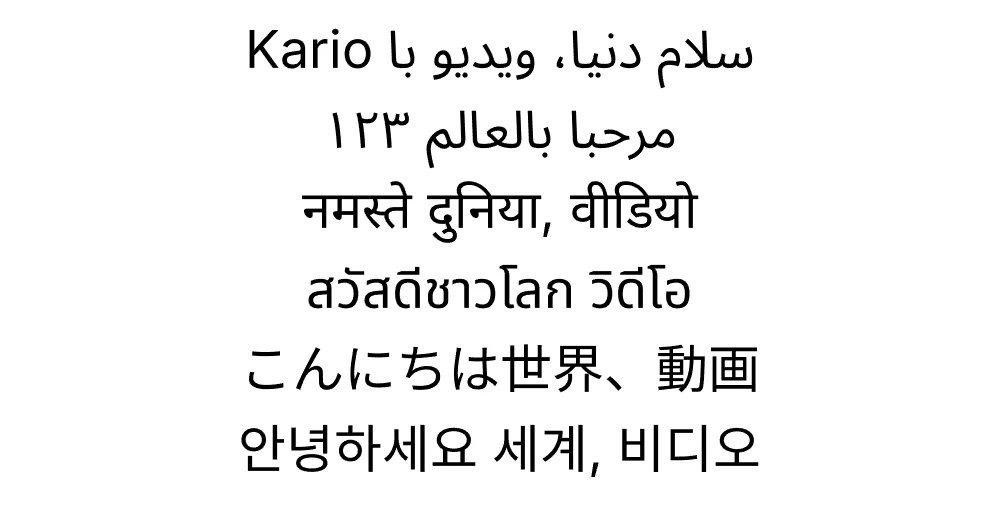
Kario sets text in Arabic, Persian, Hindi, Thai, Japanese and Korean, with fonts for each built in. Arabic and Persian run right to left with their letters joined, and any of them can share a line with English.
Every line is a real text layer, so you can change the wording, size, colour or timing after Kario builds the video, and export it to MP4 or a transparent MOV for your editing app.
From $19 a video · Updated October 18, 2026
What works
- Arabic and Persian right to left, with letters in their joined forms, local digits and the zero-width non-joiner.
- Hindi and other Devanagari text with its conjuncts and vowel signs.
- Thai with its vowel and tone marks.
- Japanese and Korean.
- English in the same line as any of them, each part in its own direction.
- Word-by-word and letter-by-letter reveals follow reading order, so right-to-left text reveals from the right.
Animating joined scripts
Arabic, Persian and Devanagari letters connect to each other. An animation that moves letters apart, such as a bounce or a scatter, breaks those connections. For these scripts, animate by word or by line, and keep letter-by-letter animation to reveals and fades.
One video, several languages
Each language can be its own board in the same project, sharing the layout, brand and assets, so a translated version is a copy with new text rather than a new video. Upload your own recording in any language and Kario times the animation to it.
Who it's for
- Creators and educators making explainers and social videos outside English.
- Brands publishing the same video in several languages.
- Editors who need titles in their language over their own footage.
Questions
- Which languages does Kario support?
- Latin-script languages plus Arabic, Persian, Hindi, Thai, Japanese and Korean, with fonts for each built in.
- Does right-to-left text work?
- Yes. Arabic and Persian are laid out right to left with joined letters, and can share a line with English.
- Can I export titles in these languages with a transparent background?
- Yes. Export a transparent MOV (ProRes 4444) for Premiere Pro, Final Cut or DaVinci Resolve, or a WebM for the web.
- How much does it cost?
- Per finished video: a monthly plan, or a single trial video for $19 with revisions included.
Related
- Transparent background motion graphicsMake motion graphics from a written brief and export them with an alpha channel: a ProRes 4444 MOV for Premiere Pro, Final Cut and DaVinci Resolve, or a VP9 WebM for the web..
- AI motion graphics generatorKario turns a written brief into motion graphics and hands you an editable project: scenes, layers, a timeline and keyframes.
- AI explainer video generatorKario writes the script, records the voiceover and animates an explainer timed to it, as an editable project with scenes, layers and keyframes..
- PricingPer finished video, from $19.